User Guide – Arduino
This guide uses the ESP32 development board as an example.
Usage Notes
AprilTag generation (Tag Recognition)
You can generate tags using an online AprilTag generator.
Set Tag Family toTAG36H11 (this is the family used by the Vision Module).
Set Tag ID as needed (typical range: 0–200).
Print the generated tag and ensure good lighting and focus during testing.
QR code generation (QR Code Recognition)
Use any standard QR code generator website or tool.
Enter the text/content to be encoded and click Generate.
Ensure sufficient print quality and size so the module can decode reliably.
Class: AiCamera
The AiCamera class is the fundamental object used to operate the AI Vision Module.
Constructor
class AiCamera(uint8_t addr=0x24)
Create an AI camera object.
addrsets the device address. The AI Vision Module supports three optional addresses:0x24,0x25, and0x26.The default value of
addris0x24.
Parameter Macros
enum Register
{
    AI_CAMERA_COLOR,            // Color detection
    AI_CAMERA_PATCH,            // Color block tracking
    AI_CAMERA_TAG,              // Label recognition
    AI_CAMERA_LINE,             // Line recognition
    AI_CAMERA_20_CLASS,         // 20-class object recognition
    AI_CAMERA_QRCODE,           // QR code recognition
    AI_CAMERA_FACE_ATTRIBUTE,   // Face attributes
    AI_CAMERA_FACE_RE,          // Face recognition
    AI_CAMERA_DEEP_LEARN,       // Deep learning
    AI_CAMERA_CARD,             // Card recognition
    AI_CAMERA_WIFI_SERVER,      // WiFi image transmission
};
enum Color
{
    AI_CAMERA_COLOR_RED,     // Red
    AI_CAMERA_COLOR_GREEN,   // Green
    AI_CAMERA_COLOR_BLUE,    // Blue
    AI_CAMERA_COLOR_YELLOW,  // Yellow
    AI_CAMERA_COLOR_BLACK,   // Black
    AI_CAMERA_COLOR_WHITE,   // White
};
These macros are used when switching modes, reading/writing data in a specific mode, and configuring color settings of the Vision Module.
Functions
Initialization
Init
Init(TwoWire *wire)
Initialization Function
Parameters:
wire– Pointer to the I²C object
Example Usage:
#include <Arduino.h>
#include "ai_camera.h"

AiCamera ai_camrea_handle;

void setup()
{
    Wire.begin();
    ai_camrea_handle.Init(&Wire);
}

void loop()
{
}
begin
begin(TwoWire *wire)
Use the same
Initfunction to maintain consistency with the Arduino coding style.
Vision Mode
Operating Modes
set_sys_mode
set_sys_mode(uint8_t mode)
Set the operating mode of the AI Vision Module.
Parameter:
mode– Operating modeRefer to the predefined mode macros (e.g.,
AI_CAMERA_COLOR,AI_CAMERA_TAG, etc.)
Example Usage:
#include <Arduino.h>
#include "ai_camera.h"

AiCamera ai_camrea_handle;

void setup()
{
    Wire.begin();
    ai_camrea_handle.Init(&Wire);
    ai_camrea_handle.set_sys_mode(AI_CAMERA_QRCODE);
}

void loop()
{
}
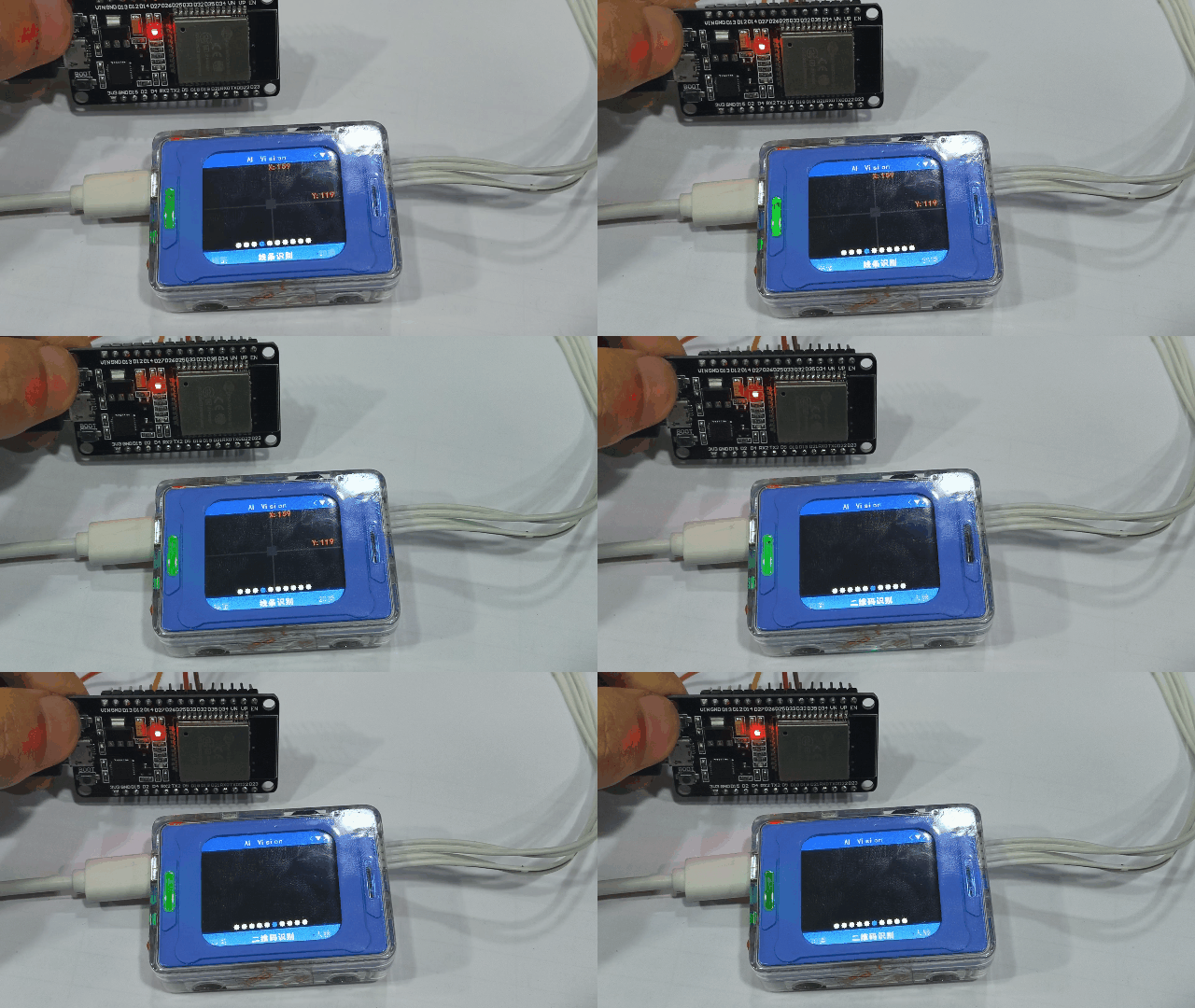
After uploading the code to the development board and resetting the chip, the operating mode of the Vision Module switches from Line Recognition mode to QR Code Recognition mode.
get_sys_mode
get_sys_mode()
Get the device’s current working mode
Return value:
AI_CAMERA_COLOR ~ AI_CAMERA_CARD
Use parameter macros to compare which type is returned
Example Usage:
#include <Arduino.h>
#include "ai_camera.h"

AiCamera ai_camrea_handle;

void setup()
{
    Serial.begin(115200);
    Wire.begin();
    ai_camrea_handle.Init(&Wire)
}

void loop()
{
    int get_mode = ai_camrea_handle.get_sys_mode();
    if (get_mode == AI_CAMERA_TAG)
    {
        Serial.println("处于标签识别模式");
    }
    else if (get_mode == AI_CAMERA_FACE_ATTRIBUTE)
    {
        Serial.println("处于人脸检测模式");
    }
    else
    {
        Serial.println("其他模式");
    }
    delay(400);
}
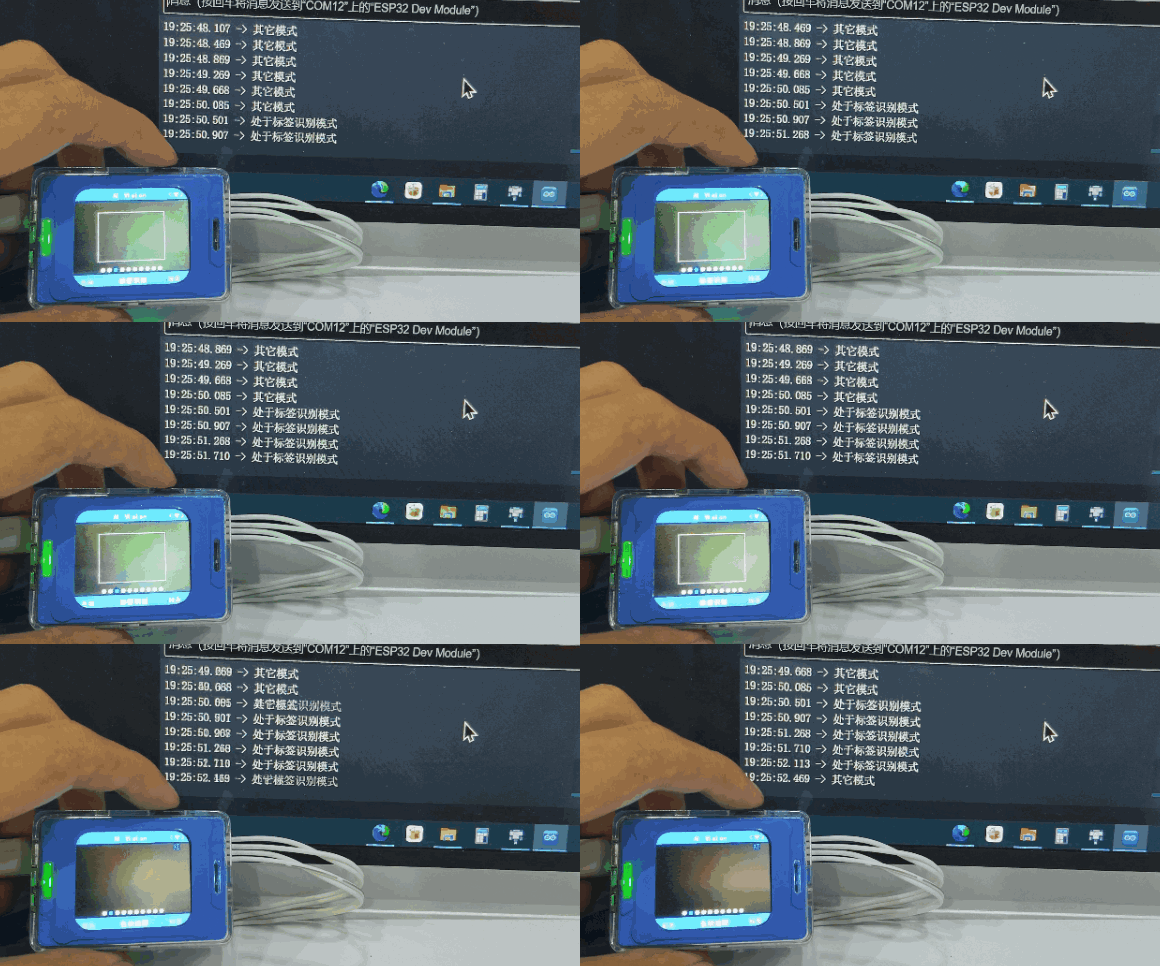 By switching modes using the rotary dial, the corresponding mode name is printed through the serial port when the system enters Tag Recognition Mode or Face Detection Mode.
Color recognition
get_color_rgb
get_color_rgb(int rgb[3])
Get the RGB values for color recognition (array type)
Parameter :
rgb[3]– int type, an RGB buffer of size 3
Example Usage:
#include <Arduino.h>
#include "ai_camera.h"

AiCamera ai_camrea_handle;

void setup()
{
    Serial.begin(115200);
    Wire.begin();
    ai_camrea_handle.Init(&Wire);
    ai_camrea_handle.set_sys_mode(AI_CAMERA_COLOR);
    delay(1000);
}

void loop()
{
    int rgb[3] = {0};
    ai_camrea_handle.get_color_rgb(rgb);
    Serial.print("rgb:(");
    Serial.print(rgb[0]);
    Serial.print(" ");
    Serial.print(rgb[1]);
    Serial.print(" ");
    Serial.print(rgb[2]);
    Serial.println(")");

    delay(400);
}
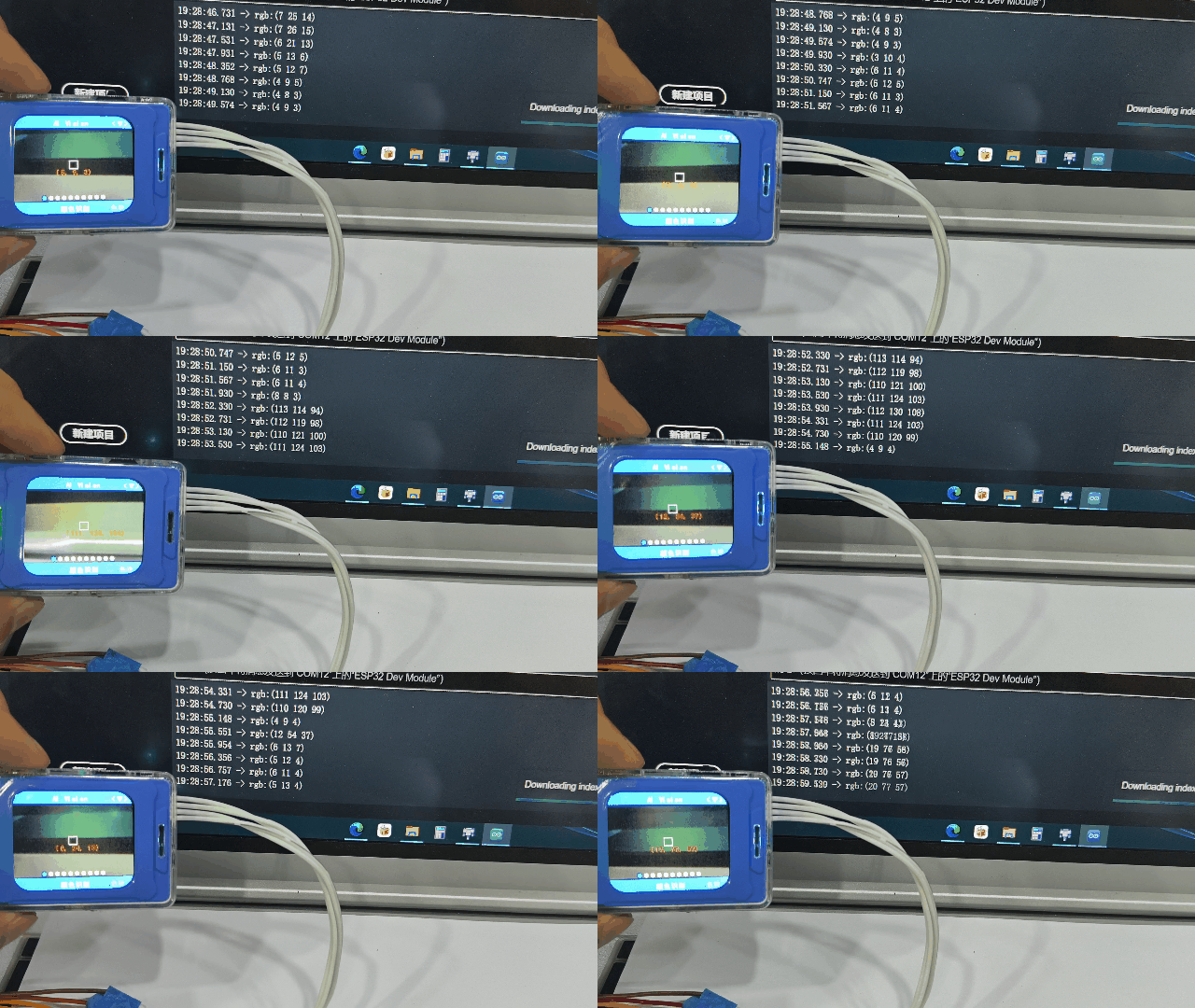
There is a white box at the center of the vision module, which is the color extraction area. Below the white box, the extracted RGB values are displayed, and these values are consistent with those printed via the serial port.
get_color_rgb
get_color_rgb(int &r, int &g, int &b)
Get the RGB values for color recognition
Parameters:
r– Red, int type referenceg– Green, int type referenceb– Blue, int type reference
Example Usage:
#include <Arduino.h>
#include "ai_camera.h"

AiCamera ai_camrea_handle;


void setup()
{
    Serial.begin(115200);
    Wire.begin();
    ai_camrea_handle.Init(&Wire);
    ai_camrea_handle.set_sys_mode(AI_CAMERA_COLOR);
    delay(1000);
}

void loop()
{
    int r, g, b;
    ai_camrea_handle.get_color_rgb(r, g, b);
    Serial.print("rgb:(");
    Serial.print(r);
    Serial.print(" ");
    Serial.print(g);
    Serial.print(" ");
    Serial.print(b);
    Serial.println(")");

    delay(400);
}
Refer to the previous function with the same name for usage.
Color block tracking
set_find_color
set_find_color(uint8_t color_id)
Set the color for color block tracking
Parameter:
color_id– The color to trackAI_CAMERA_COLOR_RED, // Red
AI_CAMERA_COLOR_GREEN, // Green
AI_CAMERA_COLOR_BLUE, // Blue
AI_CAMERA_COLOR_YELLOW, // Yellow
AI_CAMERA_COLOR_BLACK, // Black
AI_CAMERA_COLOR_WHITE, // White
Example Usage:
#include <Arduino.h>
#include "ai_camera.h"

AiCamera ai_camrea_handle;


void setup()
{
    Serial.begin(115200);
    Wire.begin();
    ai_camrea_handle.Init(&Wire);
    ai_camrea_handle.set_sys_mode(AI_CAMERA_BLOB);
    delay(1000);
    ai_camrea_handle.set_find_color(AI_CAMERA_COLOR_GREEN);
}

void loop()
{
}
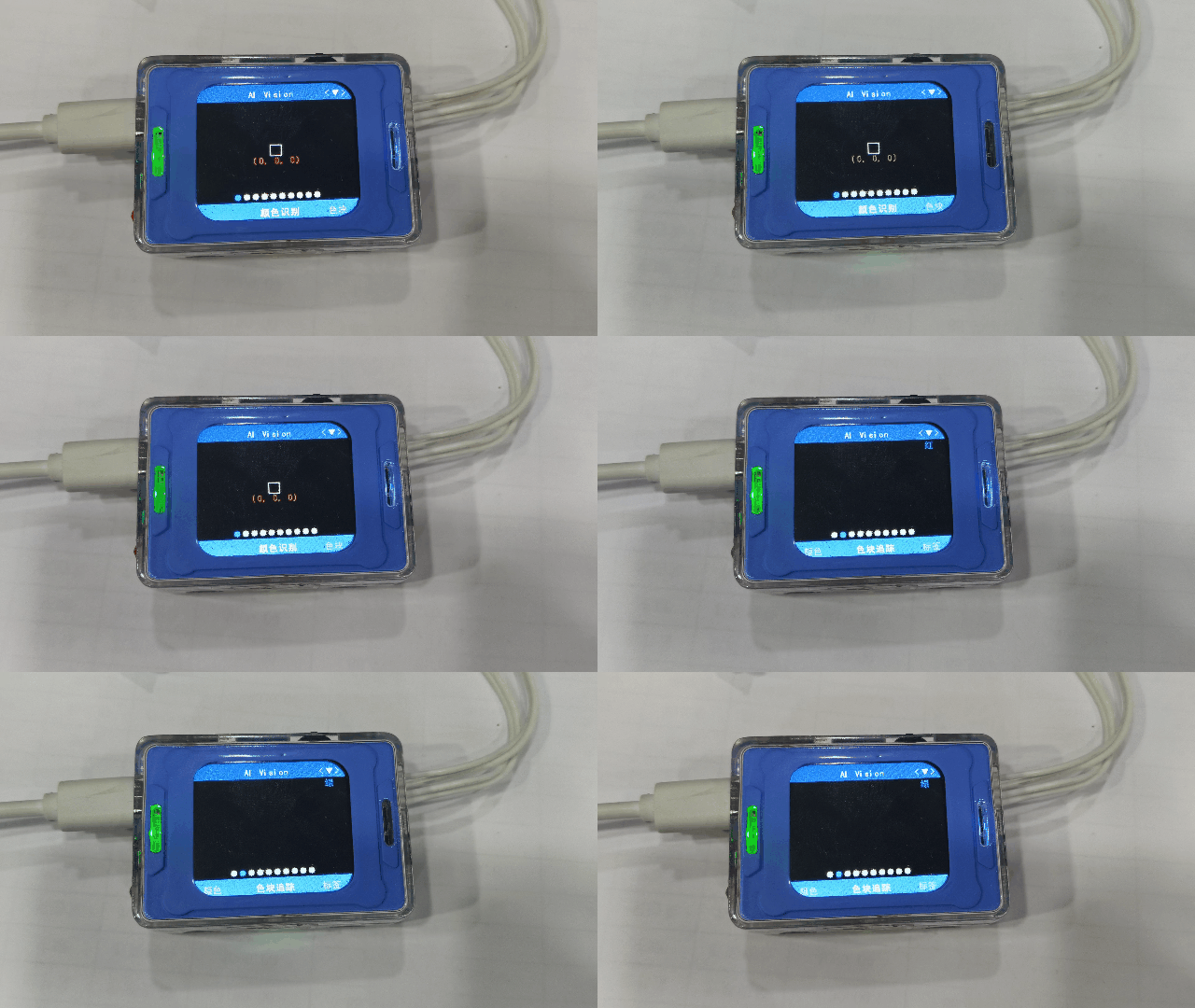
After uploading the code to the development board and resetting the chip, the vision module switches from color recognition mode to color block tracking mode, and the top-right corner indicates that the tracked color is green.
get_identify_num
get_identify_num(uint8_t features, uint8_t total=0)
Get whether a color is detected
Parameter :
features– Function selectionAI_CAMERA_PATCH # Color block tracking
total– Total number of detections
This parameter is invalid in color block tracking mode
Return value:
Returns 1 if detected, 0 if not detected
Usage example :
#include <Arduino.h>
#include "ai_camera.h"

AiCamera ai_camrea_handle;


void setup()
{
    Serial.begin(115200);
    Wire.begin();
    ai_camrea_handle.Init(&Wire);

    ai_camrea_handle.set_sys_mode(AI_CAMERA_PATCH);
    delay(1000);
    ai_camrea_handle.set_find_color(AI_CAMERA_COLOR_GREEN);
}

void loop()
{
    if (ai_camrea_handle.get_identify_num(AI_CAMERA_PATCH) > 0)
    {
        Serial.println("find patch");
    }
    else
    {
        Serial.println("no find patch");
    }
    delay(400);
}
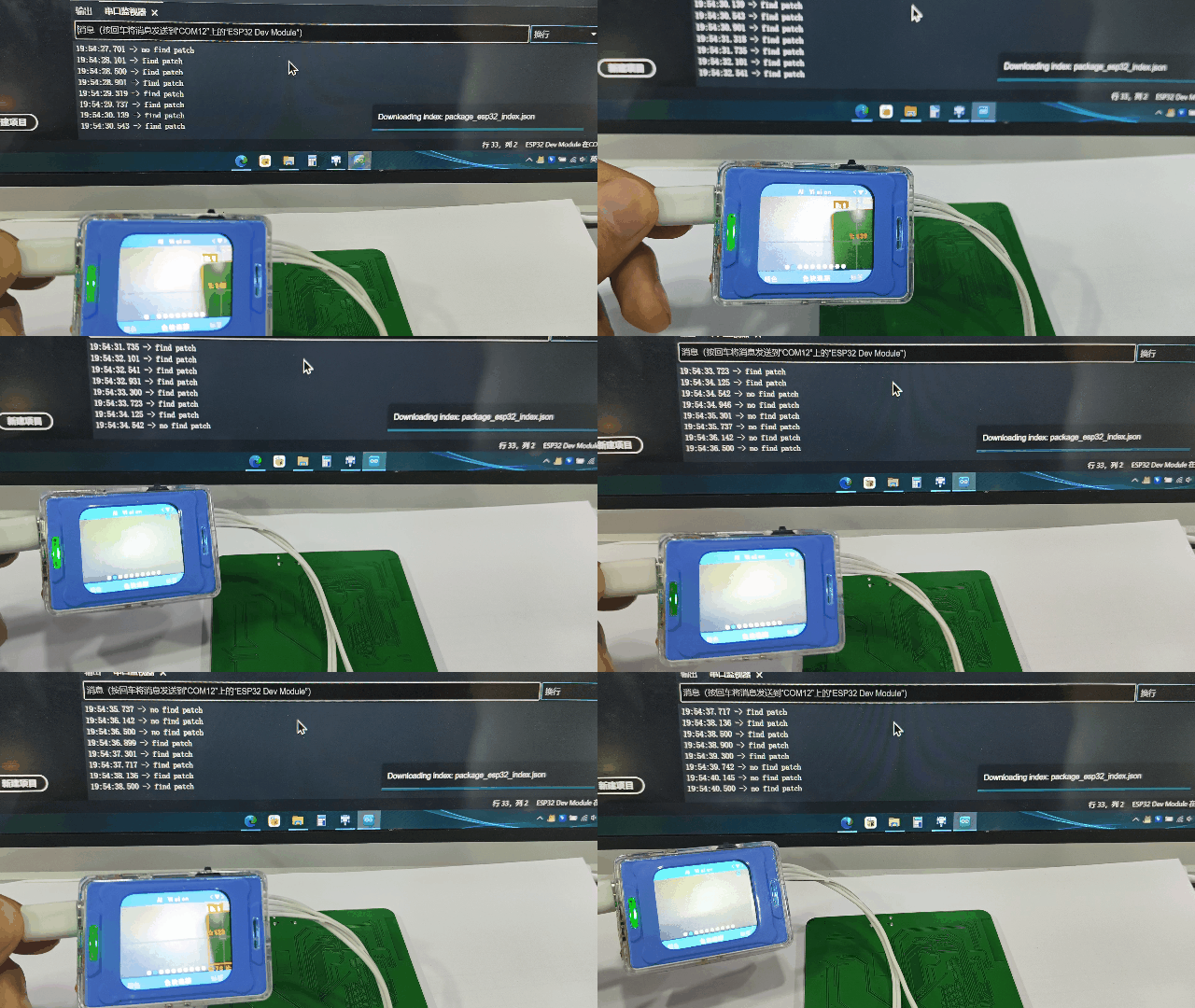
When the vision module detects a green object, it frames it and prints “find patch” to the serial port. When no green object is detected, it prints “no find patch” to the serial port.
get_identify_id
get_identify_id(uint8_t features, uint8_t index=0)
Get the ID of the detected color
Parameter :
features– Function selectionAI_CAMERA_PATCH // Color block tracking
index– Which detected objectRange 0~3, this parameter is meaningless in this mode
Return value :
Detected ID
In
color block tracking mode, IDs 1–6 represent Red, Green, Blue, Yellow, Black, and White, respectively; you can use the color macros in the AiCamera class to check. (The retrieved value is the set color ID, which can be obtained regardless of whether a color block is detected.)
get_identify_position
get_identify_position(uint8_t features, int16_t position[4], uint8_t index=0)
Get the position of the detected color
Parameters :
features– Function selectionAI_CAMERA_PATCH // Color block tracking
position[4]–int16_ttype, a position buffer of size 4The four values represent x, y, w, h
index– Which detected objectDefault is 0
get_identify_position
get_identify_position(AI_CAMERA_REGISTER_t features, int &x, int &y, int &w, int &h, uint8_t index=0)
Get the position of the detected color
Parameters :
features– Function selectionAI_CAMERA_PATCH // Color block tracking
x– int type referencey– int type referencew– int type referenceh– int type referenceindex– Which detected objectDefault is 0
Label recognition
get_identify_num
get_identify_num(uint8_t features, uint8_t total=0)
Get the number of detected labels
Parameter :
features– Function selectionAI_CAMERA_TAG # Label recognition
total– Total number of detections
This parameter is invalid in label recognition mode
Return value :
Returns the number of detected labels.
get_identify_id
get_identify_id(uint8_t features, uint8_t index=0)
Get the ID of the detected label
Parameter :
features– Function selectionAI_CAMERA_TAG // Label recognition
index– Which detected objectRange 0~3, this parameter is meaningless in this mode
Return value :
Detection ID
In
label recognition mode, IDs 0~… represent the IDs assigned during label creation; they are the IDs that the labels themselves represent.
Usage example: Check the detected label ID
|
|
|
|---|---|---|
|
|
|
|
|
|
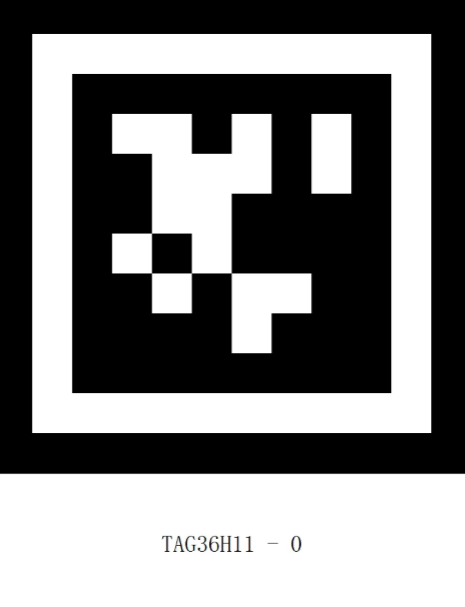

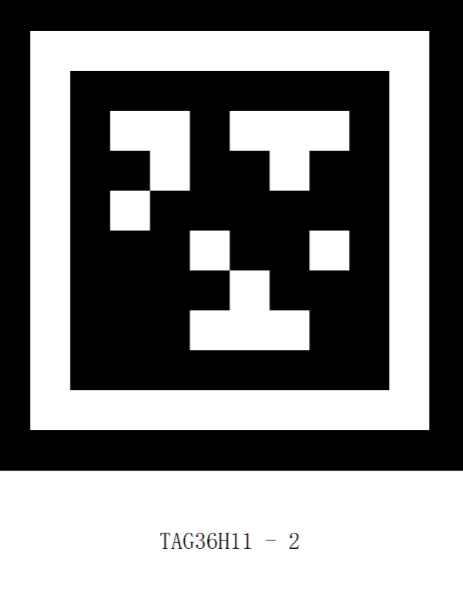
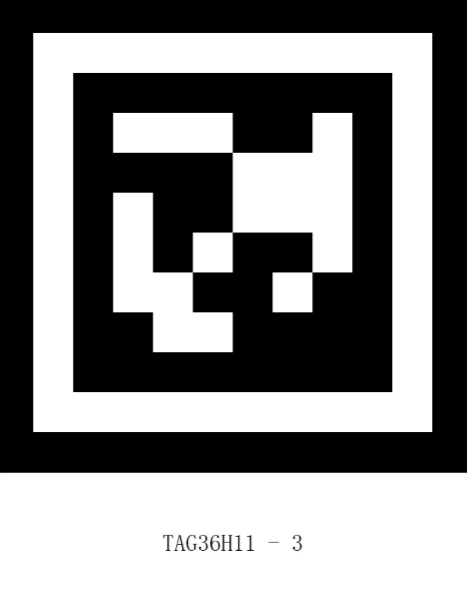





Labels with IDs ranging from 0 to 8.
#include <Arduino.h>
#include "ai_camera.h"

AiCamera ai_camrea_handle;

void setup()
{
    Serial.begin(115200);
    Wire.begin();
    ai_camrea_handle.Init(&Wire);
    ai_camrea_handle.set_sys_mode(AI_CAMERA_TAG);
    delay(1000);
}

void loop()
{
    if (ai_camrea_handle.get_identify_num(AI_CAMERA_TAG) > 0)
    {
        int target_id = ai_camrea_handle.get_identify_id(AI_CAMERA_TAG);
        Serial.print("tag id: ");
        Serial.println(target_id);
    }
    else
    {
        Serial.println("no find tag");
    }
    delay(400);
}
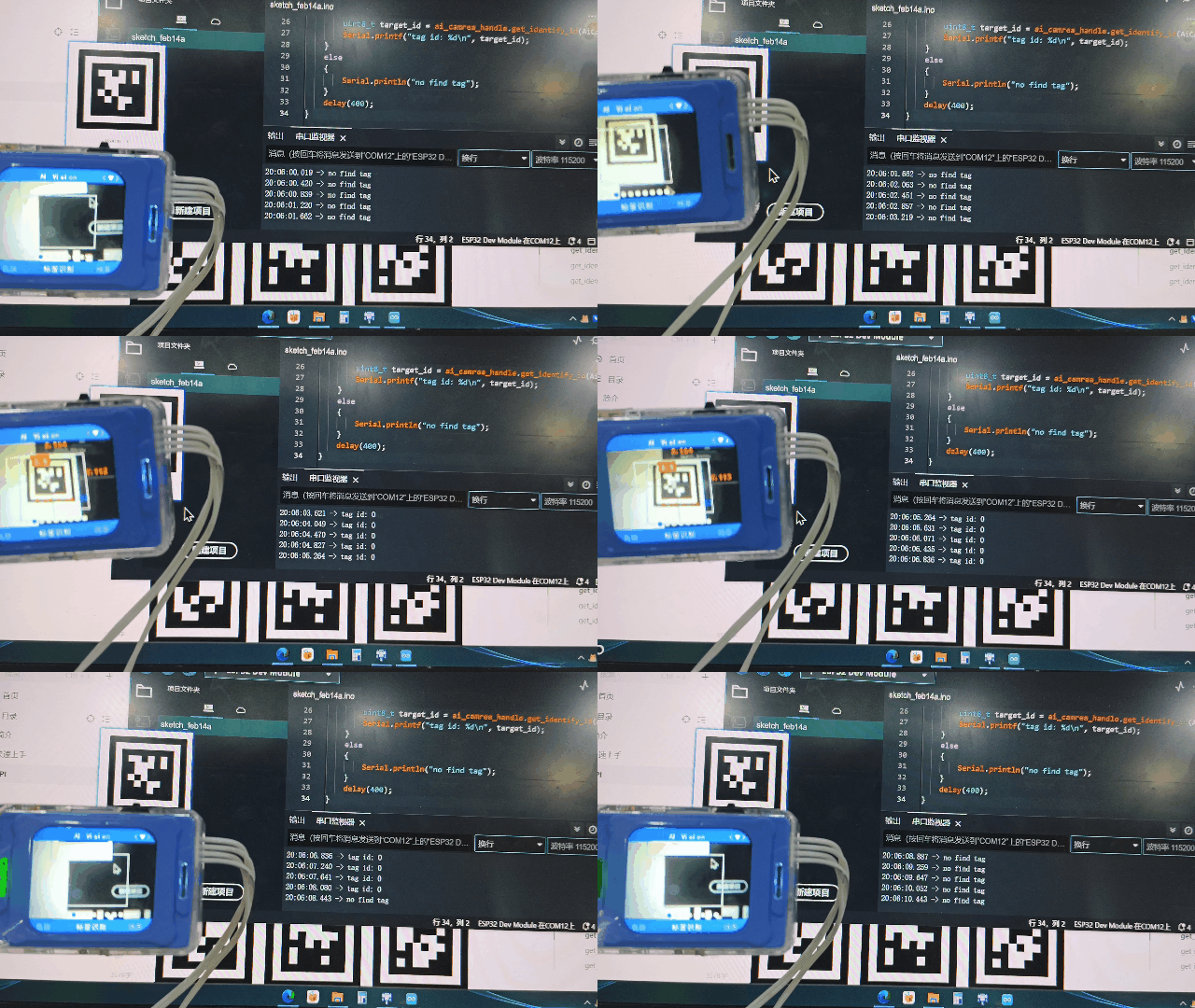
When the vision module does not detect a label, it prints “no find tag” to the serial port. When a label is detected, it prints the label’s ID.
get_identify_rotation
get_identify_rotation(uint8_t features, uint8_t index=0)
Get the rotation angle of the detected label
Parameter :
features– Function selectionAI_CAMERA_TAG #Label recognition
index Which detected object
Default is 0. Usually 0 is sufficient; this parameter is reserved for future functionality expansion.
Return value :
0~359
Usage example

#include <Arduino.h>
#include "ai_camera.h"

AiCamera ai_camrea_handle;

void setup()
{
    Serial.begin(115200);
    Wire.begin();
    ai_camrea_handle.Init(&Wire);

    ai_camrea_handle.set_sys_mode(AI_CAMERA_TAG);
    delay(1000);
}

void loop()
{
    if (ai_camrea_handle.get_identify_num(AI_CAMERA_TAG) > 0)
    {
        int rot = ai_camrea_handle.get_identify_rotation(AI_CAMERA_TAG);
        Serial.print("rot: ");
        Serial.println(rot);
    }
    else
    {
        Serial.println("no find tag");
    }
    delay(400);
}
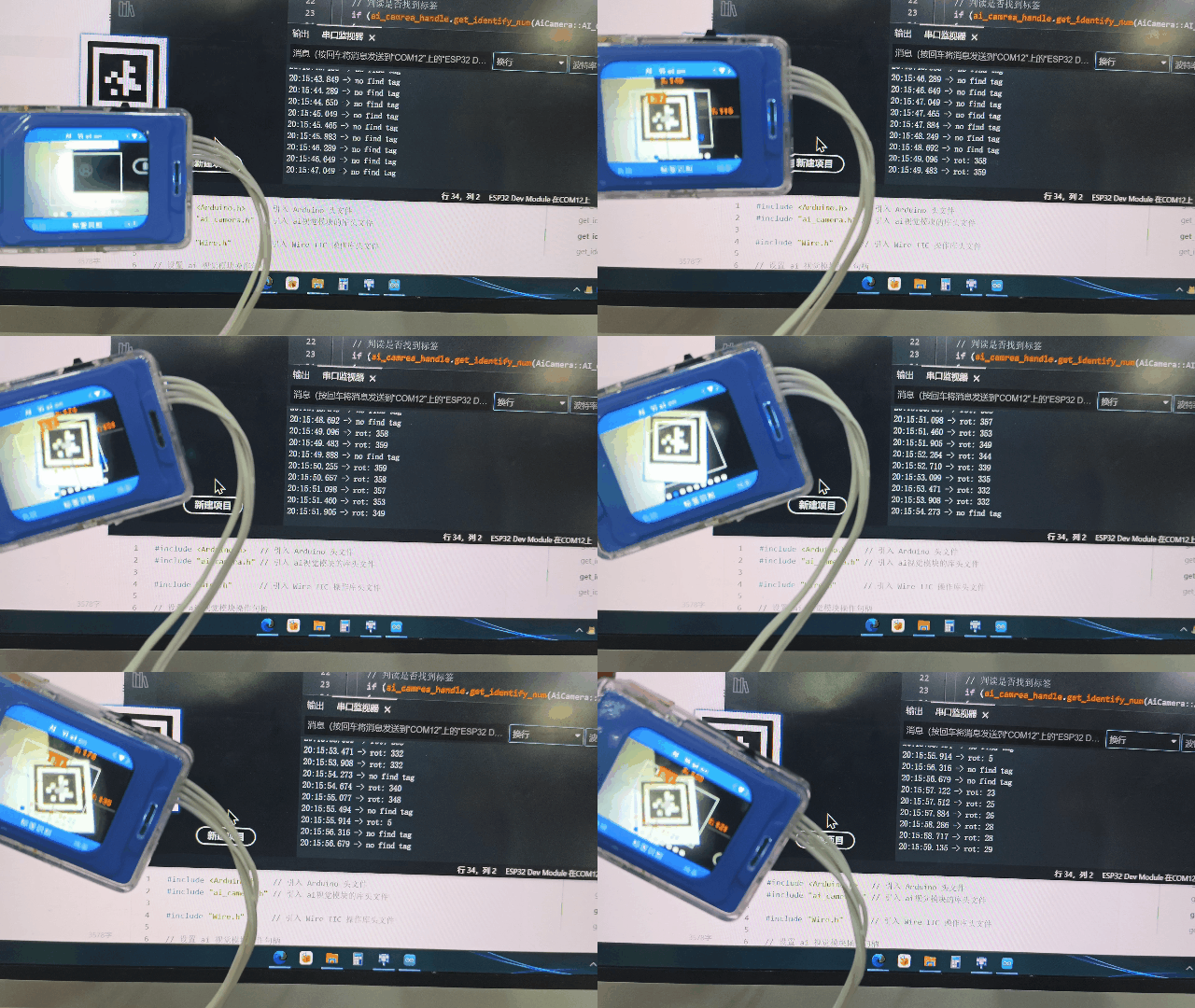
When the vision module detects a label, rotate the vision module and the serial port prints the angle of the label relative to the vision module. If no label is detected, it prints “no find tag”.
get_identify_position
get_identify_position(uint8_t features, int16_t position[4], uint8_t index=0)
Get the position of the detected label
Parameter :
features– Function selectionAI_CAMERA_TAG // Label recognition
position[4]–int16_ttype, a position buffer of size 4The four values represent x, y, w, h
index– Which detected objectDefault is 0
Usage example:

#include <Arduino.h>
#include "ai_camera.h"

AiCamera ai_camrea_handle;

void setup()
{
    Serial.begin(115200);
    Wire.begin();
    ai_camrea_handle.Init(&Wire);

    ai_camrea_handle.set_sys_mode(AI_CAMERA_TAG);
    delay(1000);
}

void loop()
{
    if (ai_camrea_handle.get_identify_num(AI_CAMERA_TAG) > 0)
    {

        int position[4] = {0};

        ai_camrea_handle.get_identify_position(AI_CAMERA_TAG, position);
        Serial.print("x y w h:(");
        Serial.print(position[0]);
        Serial.print(" ");
        Serial.print(position[1]);
        Serial.print(" ");
        Serial.print(position[2]);
        Serial.print(" ");
        Serial.print(position[3]);
        Serial.println(")");


        int pos_x = position[0];
        if (pos_x > 170)
        {
            Serial.println("Position shifted to the right");
        }
        else
        {
            Serial.println("Position shifted to the left");
        }
    }
    else
    {
        Serial.println("no find tag");
    }
    delay(400);
}
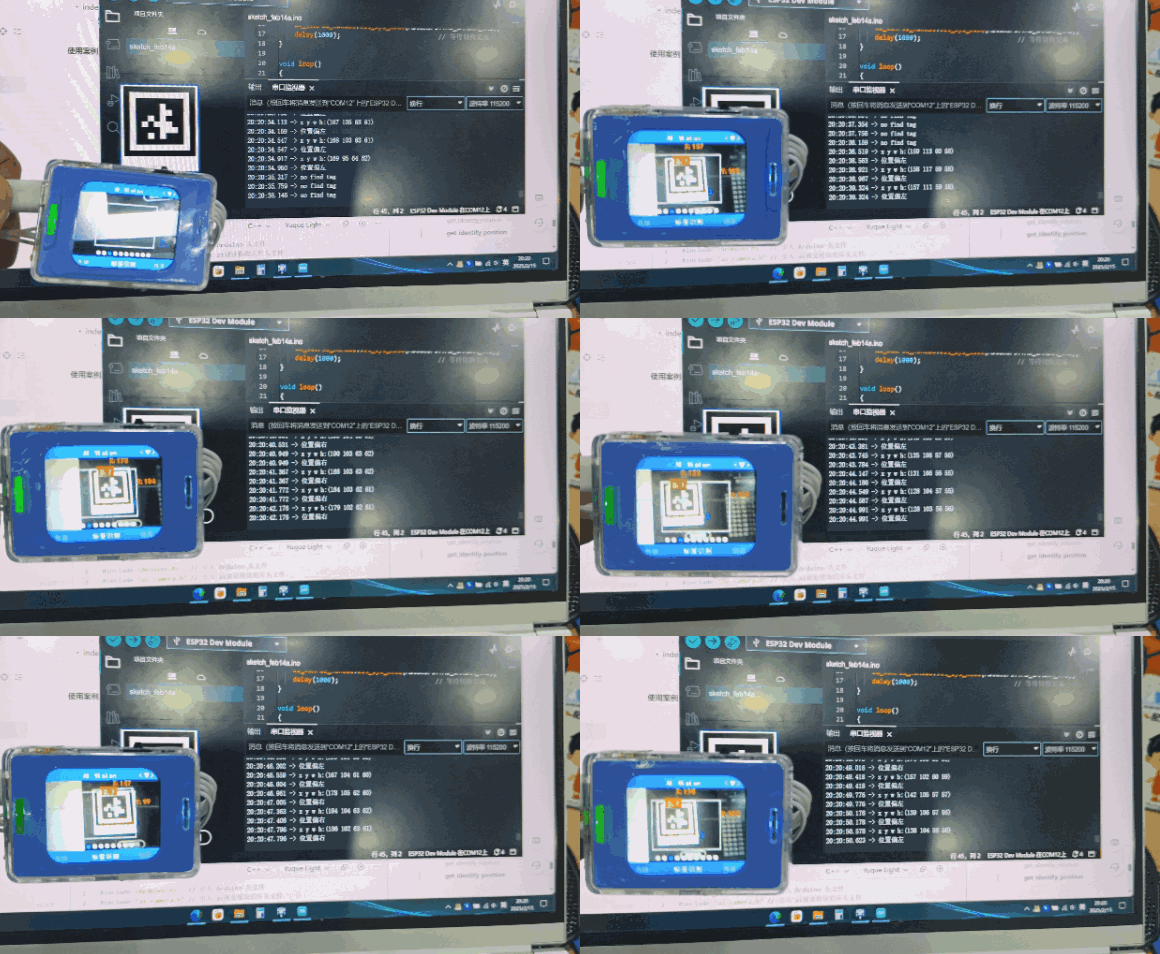
When the vision module detects a tag, the tag coordinates are printed through the serial port. Moving the vision module to the left or right outputs “Tag Position: Left” or “Tag Position: Right” respectively. If no tag is detected, “Tag Not Detected” is printed through the serial port.
get_identify_position
get_identify_position(AI_CAMERA_REGISTER_t features, int &x, int &y, int &w, int &h, uint8_t index=0)
Get the position of the detected label
Parameter :
features– Function selectionAI_CAMERA_TAG // Label recognition
x– int type referencey– int type referencew– int type referenceh– int type referenceindex– Which detected objectDefault is 0
Usage example:
#include <Arduino.h>   // Include the Arduino header file
#include "ai_camera.h" // Include the AI vision module library header file

// Configure the AI vision module operation handle
AiCamera ai_camrea_handle;

void setup()
{
    Serial.begin(115200);      // Initialize the serial port
    Wire.begin();          // Initialize I2C
    ai_camrea_handle.Init(&Wire); // Perform initialization
    // Switch to Tag Recognition Mode
    ai_camrea_handle.set_sys_mode(AI_CAMERA_TAG);
    delay(1000);               // Wait for the mode switch to complete
}

void loop()
{
    // Determine whether a tag is detected
    if (ai_camrea_handle.get_identify_num(AI_CAMERA_TAG) > 0)
    {
        // Position buffer
        int x, y, w, h;
        // Position buffer
        ai_camrea_handle.get_identify_position(AI_CAMERA_TAG, x, y, w, h);
        Serial.print("x y w h:(");
        Serial.print(x);
        Serial.print(" ");
        Serial.print(y);
        Serial.print(" ");
        Serial.print(w);
        Serial.print(" ");
        Serial.print(h);
        Serial.println(")");


        int pos_x = x;
        if (pos_x > 170)
        {
            Serial.println("Position shifted to the right");
        }
        else
        {
            Serial.println("Position shifted to the left");
        }
    }
    else
    {
        Serial.println("no find tag");
    }
    delay(400);
}
Recognition result, refer to the previous function with the same name
Line recognition
get_identify_num
get_identify_num(uint8_t features, uint8_t total=0)
Get whether a line is detected
Parameter :
features– Function selectionAI_CAMERA_LINE # Line recognition
total– Total number of detections
This parameter is invalid in line recognition mode
Return value:
Returns 1 if detected, 0 if not detected
get_identify_position
get_identify_position(uint8_t features, int16_t position[4], uint8_t index=0)
Get the position of the detected line
Parameter :
features– Function selectionAI_CAMERA_LINE // Line recognition
position[4]–int16_ttype, a position buffer of size 4The four values represent x, y, w, h
index– Which detected objectDefault is 0
In
line recognition, there are three rectangular boxes; from bottom to top, the indices are 0, 1, and 2.
20-class object recognition
get_identify_num
get_identify_num(uint8_t features, uint8_t total=0)
Get the number of detected 20-class objects
Parameter:
features– Function selectionAI_CAMERA_20_CLASS# 20-class object recognition
total– Total number of detections
This parameter is invalid in 20-class object recognition mode
Return value :
Returns the number of detected labels.
get_identify_id
get_identify_id(uint8_t features, uint8_t index=0)
Get the ID of the detected 20-class object
Parameter:
features– Function selectionAI_CAMERA_20_CLASS // 20-class object recognition
index– Which detected objectRange 0~3
Return value :
Detection ID
In 20-class object recognition mode, IDs 0–19 represent ” airplane “, ” bicycle “, ” bird “, ” boat “, ” bottle “, ” bus “, ” car “, ” cat “, ” chair “, ” cow “, ” dining table “, ” dog “, ” house “, ” motorcycle “, ” person “, ” potted plant “, ” sheep “, ” sofa “, ” train “, and ” TV “.
Usage example: Check the detected 20-class object


Images of “bicycle” and “car”.
#include <Arduino.h>
#include "ai_camera.h"

AiCamera ai_camrea_handle;

void setup()
{
    Serial.begin(115200);
    Wire.begin();
    ai_camrea_handle.Init(&Wire);

    ai_camrea_handle.set_sys_mode(AI_CAMERA_20_CLASS);
    delay(1000);
}

void loop()
{
    if (ai_camrea_handle.get_identify_num(AI_CAMERA_20_CLASS) > 0)
    {

        uint8_t target_id = ai_camrea_handle.get_identify_id(AI_CAMERA_20_CLASS);
        if (target_id == 1)
        {
            Serial.println("bicycle");
        }
        else
        {
            Serial.println("other");
        }
    }
    else
    {
        Serial.println("no find 20 class");
    }
    delay(400);
}
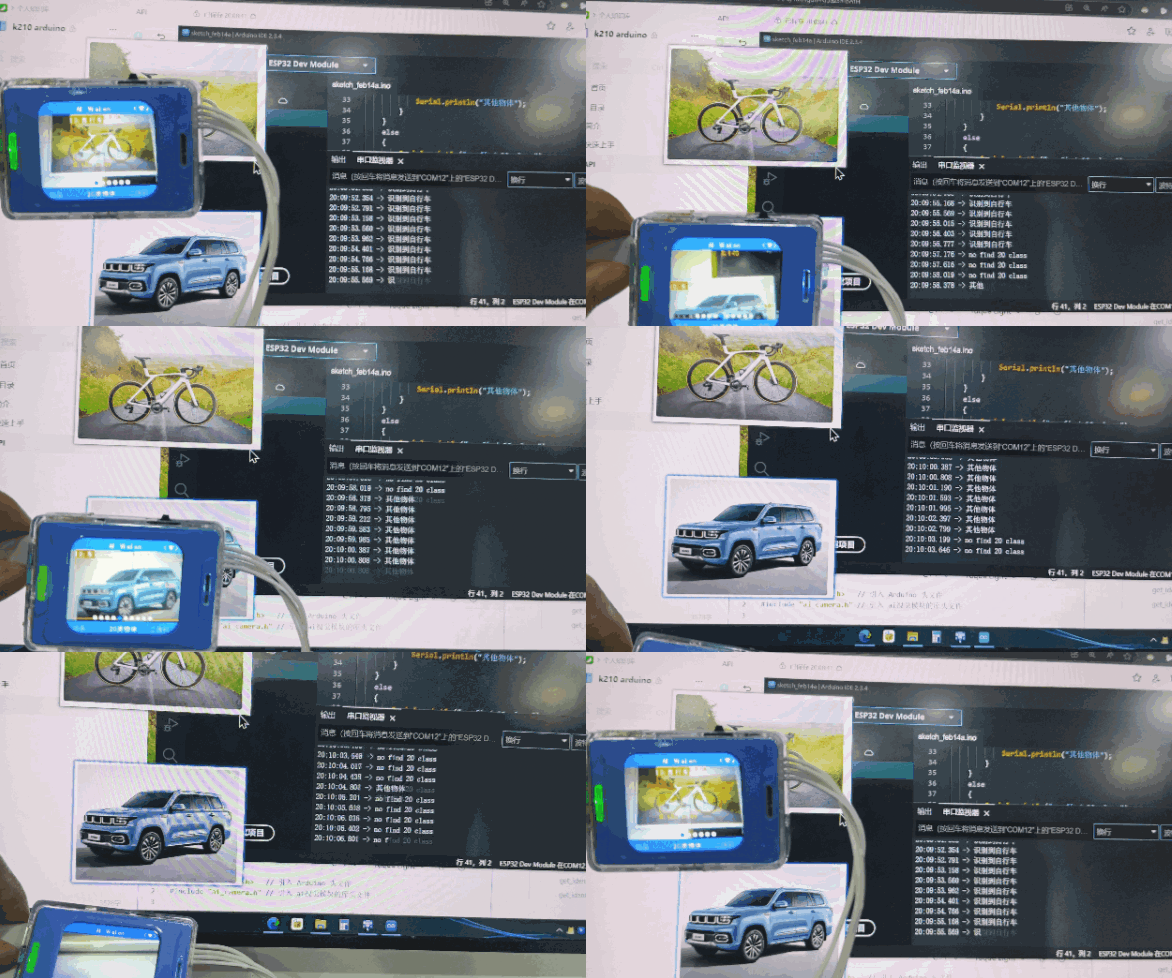
When the vision module detects a “bicycle,” “Bicycle Detected” is printed through the serial port. When the vision module detects a “car,” “Other Object Detected” is printed through the serial port. If no object belonging to the 20 predefined classes is detected, “No 20-Class Object Detected” is printed through the serial port.
get_identify_position
get_identify_position(uint8_t features, int16_t position[4], uint8_t index=0)
Get the position of the detected 20-class object
Parameter:
features– Function selectionAI_CAMERA_20_CLASS //20-class object recognition
position[4]–int16_ttype, a position buffer of size 4The four values represent x, y, w, h
index– Which detected objectDefault is 0
get_identify_position
get_identify_position(AI_CAMERA_REGISTER_t features, int &x, int &y, int &w, int &h, uint8_t index=0)
Get the position of the detected 20-class object
Parameter:
features– Function selectionAI_CAMERA_20_CLASS // 20-class object recognition
x– int type referencey– int type referencew– int type referenceh– int type referenceindex– Which detected objectDefault is 0
QR code recognition
get_qrcode_content
get_qrcode_content()
Get the content of the QR code recognition
Return value:
String
Returns a std::string type string
Usage example:

A QR code with the content “hello”.
#include <Arduino.h>
#include "ai_camera.h"

AiCamera ai_camrea_handle;

void setup()
{
    Serial.begin(115200);
    Wire.begin();
    ai_camrea_handle.Init(&Wire);

    ai_camrea_handle.set_sys_mode(AI_CAMERA_QRCODE);
    delay(1000);
}

void loop()
{

    if (ai_camrea_handle.get_identify_num(AI_CAMERA_QRCODE) > 0)
    {

        std::string qrcode_content = ai_camrea_handle.get_qrcode_content();
        Serial.print("qrocde content: ");
        Serial.println(qrcode_content);
    }
    else
    {
        Serial.println("no find qrcode");
    }
    delay(400);
}
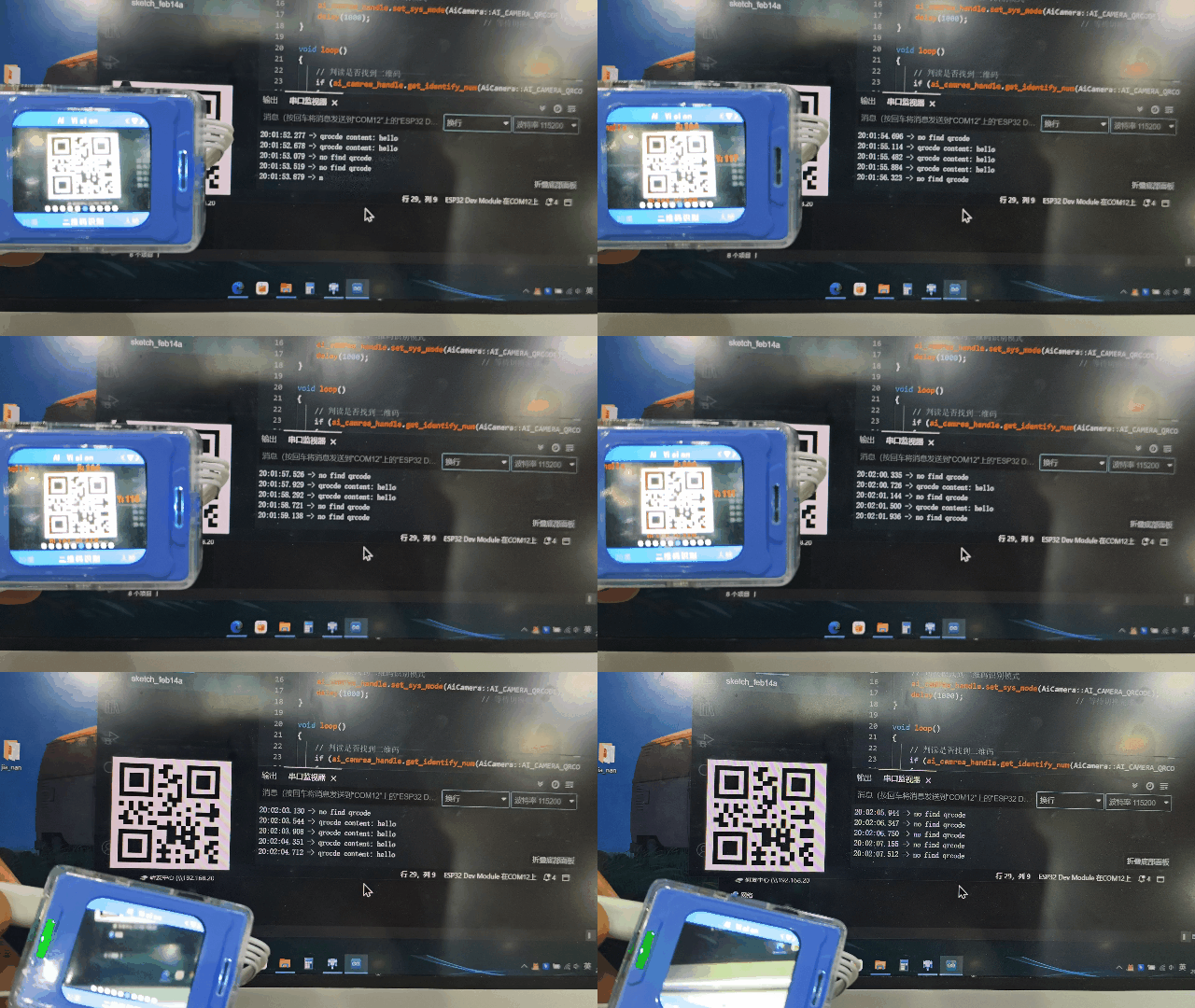
Use a QR code generator to create a QR code with the content “hello”. When the vision module detects the QR code, it prints “qrcode content: hello” to the serial port. If no QR code is detected, it prints “no find qrcode”.
get_identify_num
get_identify_num(uint8_t features, uint8_t total=0)
Get whether a QR code is detected
Parameter:
features– Function selectionAI_CAMERA_QRCODE # QR code recognition
total– Total number of detections
This parameter is invalid in QR code recognition mode
Return value:
Returns 1 if detected, 0 if not detected
get_identify_position
get_identify_position(uint8_t features, int16_t position[4], uint8_t index=0)
Get the position of the detected QR code
Parameter:
features– Function selectionAI_CAMERA_QRCODE // QR code recognition
position[4]–int16_ttype, a position buffer of size 4The four values represent x, y, w, h
index– Which detected objectDefault is 0
get_identify_position
get_identify_position(AI_CAMERA_REGISTER_t features, int &x, int &y, int &w, int &h, uint8_t index=0)
Get the position of the detected QR code
Parameter:
features– Function selectionAI_CAMERA_QRCODE //QR code recognition
x– int type referencey– int type referencew– int type referenceh– int type referenceindex– Which detected objectDefault is 0
Face attribute recognition
get_face_attributes
get_face_attributes(int &is_male, int &is_mouth_open, int &is_smail, int &is_glasses, uint8_t index=0)
Get face attributes
Parameter:
is_male– Whether maleis_mouth_open– Whether mouth is openis_glasses– Whether wearing glassesindex– Which face, default is the first one
Usage example:
#include <Arduino.h>
#include "ai_camera.h"

AiCamera ai_camrea_handle;

void setup()
{
    Serial.begin(115200);
    Wire.begin();
    ai_camrea_handle.Init(&Wire);
    ai_camrea_handle.set_sys_mode(AI_CAMERA_FACE_ATTRIBUTE);
    delay(1000);
}

void loop()
{

    if (ai_camrea_handle.get_identify_num(AI_CAMERA_FACE_ATTRIBUTE) > 0)
    {

        int is_male, is_mouth_open, is_smail, is_glasses;
        ai_camrea_handle.get_face_attributes(is_male, is_mouth_open, is_smail, is_glasses);
        Serial.print("is_male: ");
        Serial.print(is_male);
        Serial.print(", is_mouth_open: ");
        Serial.print(is_mouth_open);
        Serial.print(", is_smail: ");
        Serial.print(is_smail);
        Serial.print(", is_glasses: ");
        Serial.println(is_glasses);
    }
    else
    {
        Serial.println("No face detected.");
    }

    delay(400);
}
get_identify_num
get_identify_num(uint8_t features, uint8_t total=0)
Get the number of detected faces
Parameter:
features– Function selectionAI_CAMERA_FACE_ATTRIBUTE # Face attribute recognition
total– Total number of detections
This parameter is invalid in face attribute recognition mode
Return value :
Returns the number of detected labels.
get_identify_position
get_identify_position(uint8_t features, int16_t position[4], uint8_t index=0)
Get the position of the detected face
Parameter:
features– Function selectionAI_CAMERA_FACE_ATTRIBUTE // Face attribute recognition
position[4]–int16_ttype, a position buffer of size 4The four values represent x, y, w, h
index– Which detected objectDefault is 0
get_identify_position
get_identify_position(AI_CAMERA_REGISTER_t features, int &x, int &y, int &w, int &h, uint8_t index=0)
Get the position of the detected face
Parameter:
features– Function selectionAI_CAMERA_FACE_ATTRIBUTE // Face attribute recognition
x– int type referencey– int type referencew– int type referenceh– int type referenceindex– Which detected objectDefault is 0
Face recognition
face_study
face_study()
Start enrolling face features
This command is valid only when a face is detected; otherwise, it is invalid.
After enrollment, an ID is automatically assigned to the current face, ranging from 0–3. If more than 4 faces are enrolled, IDs start overwriting from 0.
Usage example:
#include <Arduino.h>
#include "ai_camera.h"

AiCamera ai_camrea_handle;

void setup()
{
    Serial.begin(115200);
    Wire.begin();
    ai_camrea_handle.Init(&Wire);

    ai_camrea_handle.set_sys_mode(AI_CAMERA_FACE_RE);
    delay(1000);
    ai_camrea_handle.face_study();
}

void loop()
{
}
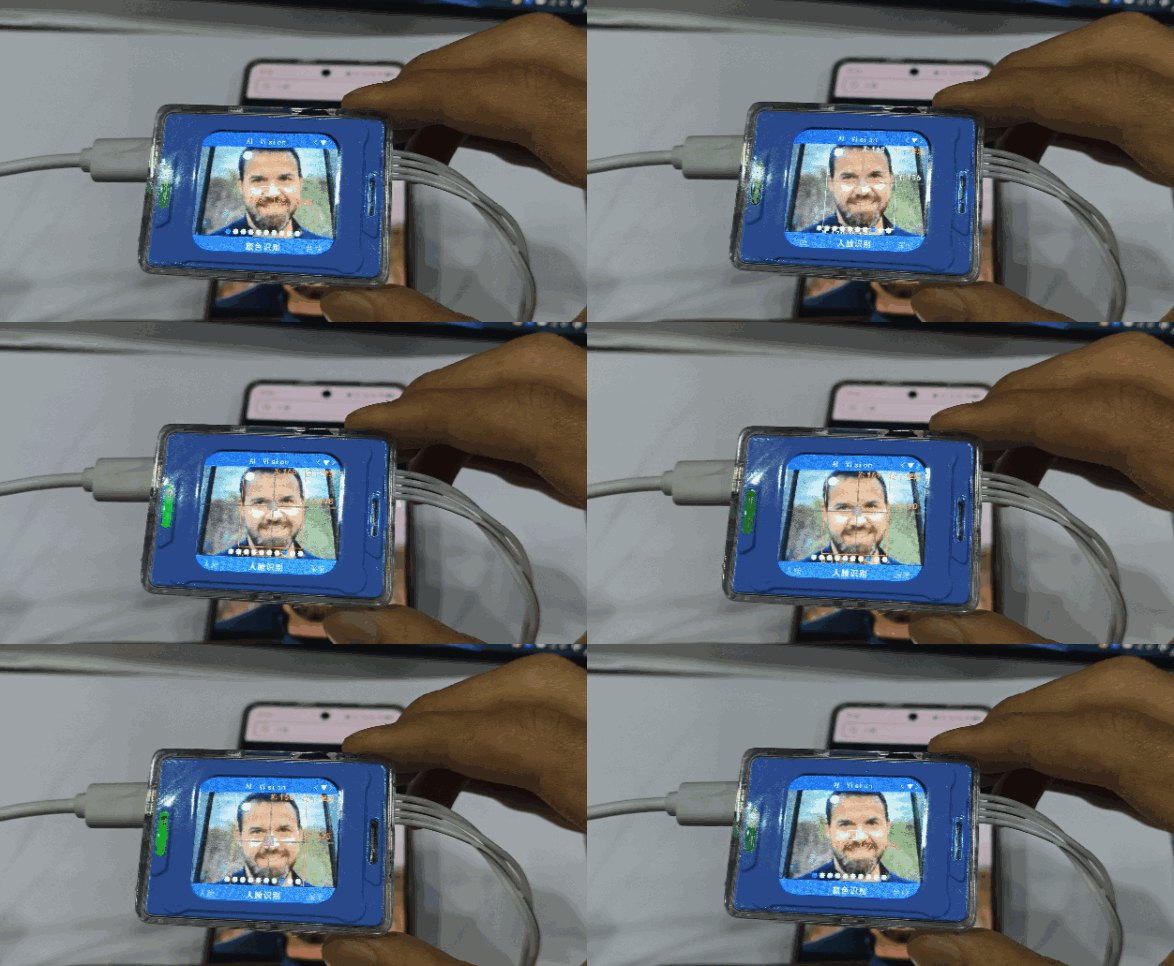
Upload the code to the development board and reset the chip while the vision module is able to detect a human face. The vision module switches from Color Recognition Mode to Face Recognition Mode and learns the detected face. The face bounding box changes from white to orange, and an ID is assigned to the detected face.
get_identify_num
get_identify_num(uint8_t features, uint8_t total=0)
Get the number of detected faces
Parameter:
features– Function selectionAI_CAMERA_FACE_RE #Face recognition
total– Total number of detections
Return value :
Returns the number of detected labels.
By default, it returns the number of enrolled faces detected. Only when total = 1 does it return the total number of faces detected on the screen (both enrolled and unenrolled faces).
get_identify_id
get_identify_id(uint8_t features, uint8_t index=0)
Get the ID of the detected face
Parameter:
features– Function selectionAI_CAMERA_FACE_RE // Face recognition
index– Which detected objectRange 0~3
Return value :
Detection ID
In
face recognition mode,IDs 0–3 are automatically assigned in order during enrollment.
get_identify_position
get_identify_position(uint8_t features, int16_t position[4], uint8_t index=0)
Get the position of the detected face
Parameter:
features– Function selectionAI_CAMERA_FACE_RE //Face recognition
position[4]–int16_ttype, a position buffer of size 4The four values represent x, y, w, h
index– Which detected objectDefault is 0
get_identify_position
get_identify_position(AI_CAMERA_REGISTER_t features, int &x, int &y, int &w, int &h, uint8_t index=0)
Get the position of the detected face
Parameter:
features– Function selectionAI_CAMERA_FACE_RE //Face recognition
x– int type referencey– int type referencew– int type referenceh– int type referenceindex– Which detected objectDefault is 0
Deep learning
deep_learn_study
deep_learn_study()
Start deep learning recognition training
Take photos continuously; when the duration exceeds 5 seconds or the number of classes exceeds 4, enter recognition mode.
Usage example:
#include <Arduino.h>
#include "ai_camera.h"

AiCamera ai_camrea_handle;


void setup()
{
    Serial.begin(115200);
    Wire.begin();
    ai_camrea_handle.Init(&Wire);
    ai_camrea_handle.set_sys_mode(AI_CAMERA_DEEP_LEARN);
    delay(1000);
    ai_camrea_handle.deep_learn_study();
}

void loop()
{
}
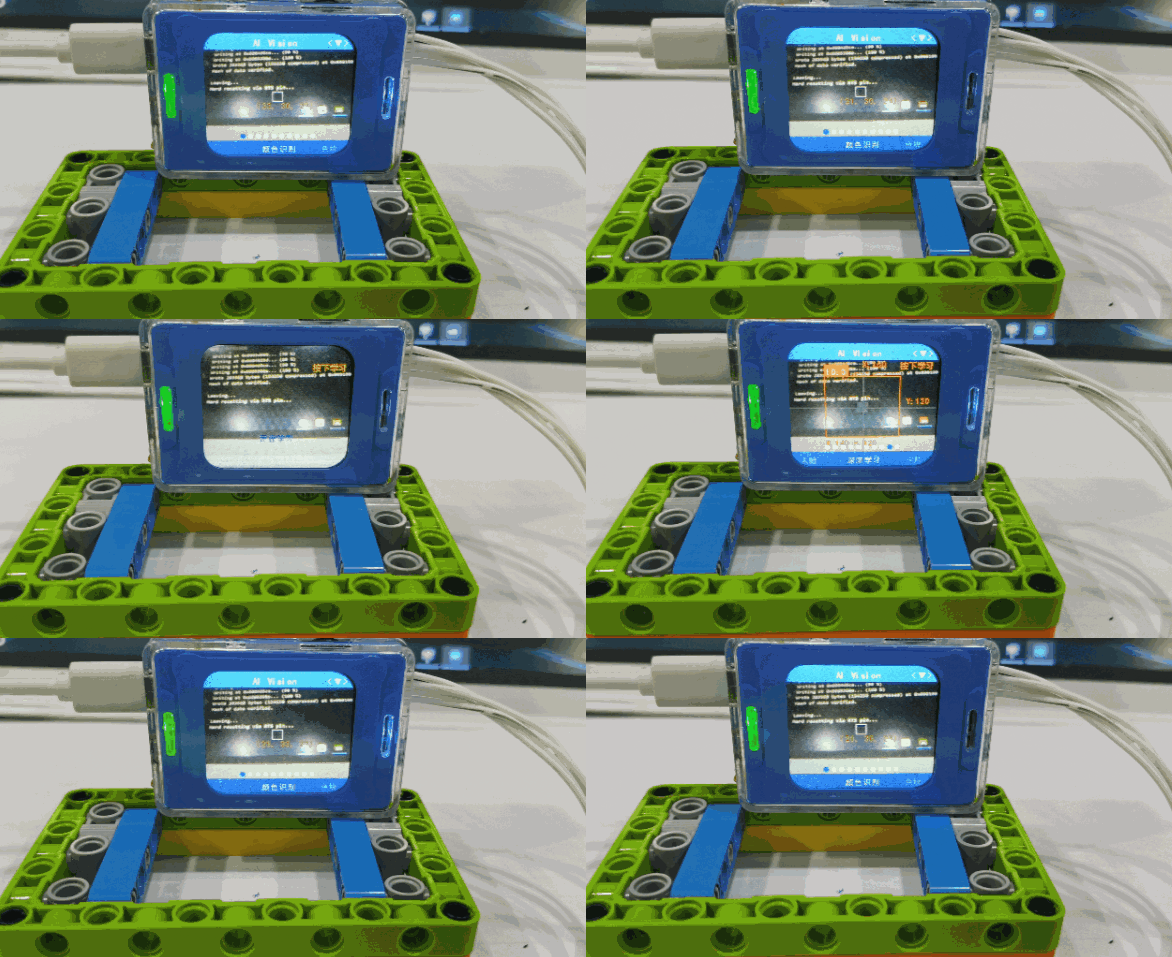
Upload the code to the development board. After resetting the chip, the vision module switches to Deep Learning Mode and performs deep learning.
get_identify_num
get_identify_num(uint8_t features, uint8_t total=0)
Get whether a deep learning object is detected
Parameter:
features– Function selectionAI_CAMERA_DEEP_LEARN #Deep learning
total– Total number of detections
This parameter is invalid in deep learning mode
Return value:
Returns 1 if detected, 0 if not detected
get_identify_id
get_identify_id(uint8_t features, uint8_t index=0)
Get the ID of the detected deep learning object
Parameter:
features– Function selectionAI_CAMERA_DEEP_LEARN // Deep learning
index– Which detected objectRange 0~3, this parameter is meaningless in this mode
Return value :
Detection ID
In
deep learning mode, IDs 0–3 are automatically assigned in order during training.
get_identify_position
get_identify_position(uint8_t features, int16_t position[4], uint8_t index=0)
Get the position of the detected deep learning object
Parameter:
features– Function selectionAI_CAMERA_DEEP_LEARN // Deep learning
position[4]–int16_ttype, a position buffer of size 4The four values represent x, y, w, h
index– Which detected objectDefault is 0
get_identify_position
get_identify_position(AI_CAMERA_REGISTER_t features, int &x, int &y, int &w, int &h, uint8_t index=0)
Get the position of the detected deep learning object
Parameter:
features– Function selectionAI_CAMERA_DEEP_LEARN // Deep learning
x– int type referencey– int type referencew– int type referenceh– int type referenceindex– Which detected objectDefault is 0
Road sign recognition
get_identify_num
get_identify_num(uint8_t features, uint8_t total=0)
Get the number of detected road signs
Parameter:
features– Function selectionAI_CAMERA_CARD # Road sign recognition
total– Total number of detections
This parameter is invalid in road sign recognition mode
Return value :
Returns the number of detected labels.
get_identify_id
get_identify_id(uint8_t features, uint8_t index=0)
Get the ID of the detected road sign
Parameter:
features– Function selectionAI_CAMERA_CARD // Road sign recognition
index– Which detected objectRange 0~3
Return value :
Detection ID
In road sign recognition mode, IDs 0–6 represent green light, left turn, stop, red light, right turn, horn, and target, respectively.
get_identify_position
get_identify_position(uint8_t features, int16_t position[4], uint8_t index=0)
Get the position of the detected road sign
Parameter:
features– Function selectionAI_CAMERA_CARD // Road sign recognition
position[4]–int16_ttype, a position buffer of size 4The four values represent x, y, w, h
index– Which detected objectDefault is 0
get_identify_position
get_identify_position(AI_CAMERA_REGISTER_t features, int &x, int &y, int &w, int &h, uint8_t index=0)
Get the position of the detected road sign
Parameter:
features– Function selectionAI_CAMERA_CARD //Road sign recognition
x– int type referencey– int type referencew– int type referenceh– int type referenceindex– Which detected objectDefault is 0
Fill light
set_light_status
set_light_status(uint8_t status)
Set the fill light status
Parameter:
status– status1:open 2:close
set_light_brightness
set_light_brightness(uint8_t brightness)
Set the fill light brightness
Parameter:
brightness– brightness0-10
get_light_brightness
get_light_brightness(uint8_t &brightness)
Get the current fill light brightness
Parameter:
brightness– brightnessint type reference
AI conversation
Get the conversation status
get_ai_chat_state
get_ai_chat_state(uint8_t &state)
Parameter:
state– Current status of AI conversationValue range:
0: AI not started,
1: Connecting,
2: Standby,
3: Listening,
4: Speaking,
5: Network configuration
Usage example:
#include <Arduino.h>
#include "ai_camera.h"

AiCamera ai_camera;

void setup(void)
{
    Serial.begin(115200);
    Wire.begin();
    ai_camrea.Init(&Wire);
}

void loop(void)
{
    char buffer[128];
    uint8_t state;

    ai_camera.get_ai_chat_state(state);

    sprintf(buffer, "state:%d", state);
    Serial.println(buffer);

    Serial.println("----------");

    delay(1000);
}
Get movement commands and speed
get_ai_chat_run_state
get_ai_chat_run_state(uint8_t &command, uint8_t &speed)
Parameter:
command– Movement commandValue range: 1: Forward, 2: Backward, 3: Turn left, 4: Turn right, 5: Stop
speed– Movement speedValue range: 0–100
Usage example:
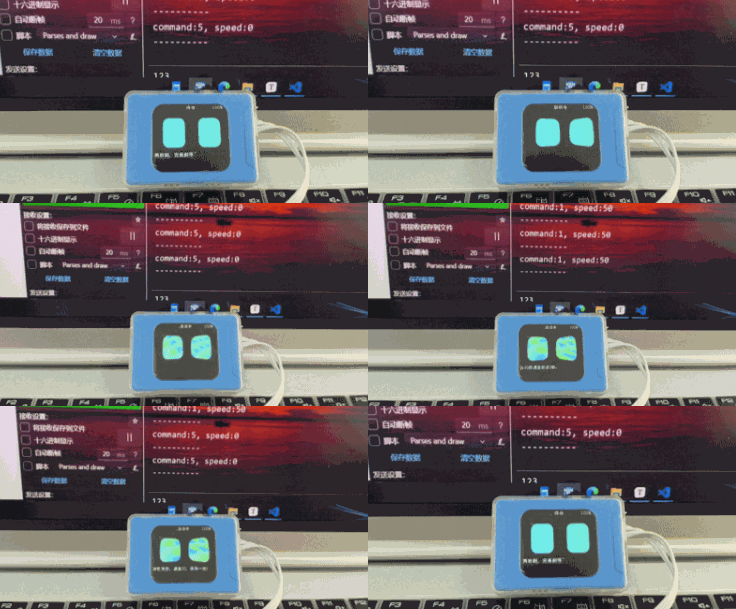
#include <Arduino.h>
#include "ai_camera.h"

AiCamera ai_camera;

void setup(void)
{
    Serial.begin(115200);
    Wire.begin();
    ai_camrea.Init(&Wire);
}

void loop(void)
{
    char buffer[128];
    uint8_t command, speed;

    ai_camera.get_ai_chat_run_state(command, speed);

    sprintf(buffer, "command:%d, speed:%d", command, speed);
    Serial.println(buffer);

    Serial.println("----------");

    delay(1000);
}
Get custom commands
get_ai_chat_custom_command
get_ai_chat_custom_command(uint8_t &command)
Parameter:
command– custom commands
Usage example:
#include <Arduino.h>
#include "ai_camera.h"

AiCamera ai_camera;

void setup(void)
{
    Serial.begin(115200);
    Wire.begin();
    ai_camrea.Init(&Wire);
}

void loop(void)
{
    char buffer[128];
    uint8_t custom_command;

    ai_camera.get_ai_chat_custom_command(custom_command);

    sprintf(buffer, "custom_command:%d", custom_command);
    Serial.println(buffer);

    Serial.println("----------");

    delay(1000);
}
WIFI image transmission
Get web page key values
Get keyboard key values
get_wifi_stream_keyboard
get_wifi_stream_keyboard(uint8_t &keyboard)
Parameter:
keyboard– Keyboard WASD key valuesEach key corresponds to a bit in a byte: 0000 WASD; when a key is pressed, the corresponding bit is set to 1.
Usage example:
#include <Arduino.h>
#include "ai_camera.h"

AiCamera ai_camera;

void setup(void)
{
    Serial.begin(115200);
    Wire.begin();
    ai_camrea.Init(&Wire);
}

void loop(void)
{
    char buffer[128];
    uint8_t keyboard;

    ai_camera.get_wifi_stream_keyboard(keyboard);

    sprintf(buffer, "keyboard:%d\n", keyboard);
    Serial.print(buffer);

    Serial.println("----------");

    delay(1000);
}
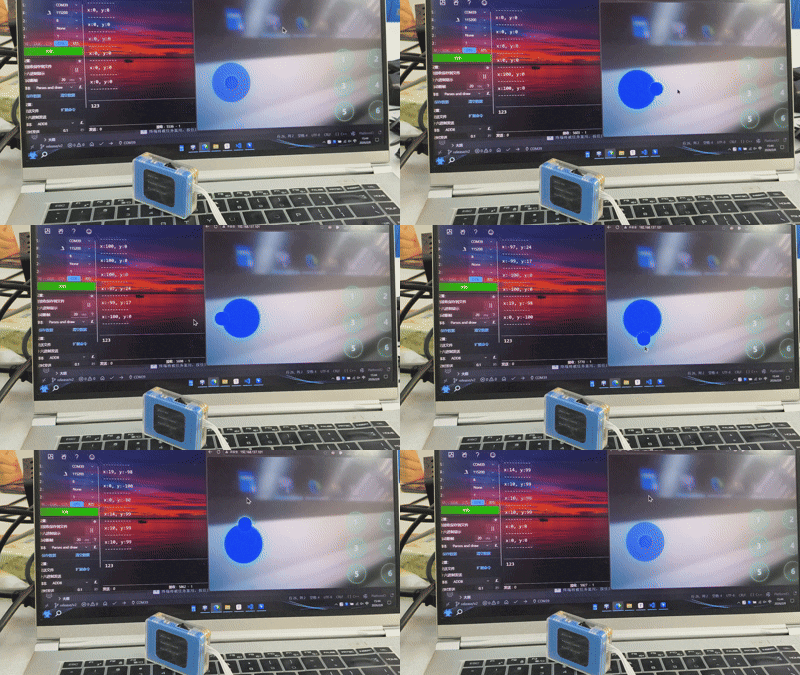
Get web page joystick values
get_wifi_stream_joystick
get_wifi_stream_joystick(int8_t &x, int8_t &y)
Get the joystick values in the X and Y directions from the web page.
Parameter:
x– Joystick value in the X direction; range: -100 to 100y– Joystick value in the Y direction; range: -100 to 100
Usage example:
#include <Arduino.h>
#include "ai_camera.h"

AiCamera ai_camera;

void setup(void)
{
    Serial.begin(115200);
    Wire.begin();
    ai_camrea.Init(&Wire);
}

void loop(void)
{
    char buffer[128];
    int8_t x, y;

    ai_camera.get_wifi_stream_joystick(x, y);

    sprintf(buffer, "x:%d, y:%d\n", x, y);
    Serial.print(buffer);

    Serial.println("----------");

    delay(1000);
}
Get network connection information
get_wifi_stream_ssid_password
get_wifi_stream_ssid_password(String &ssid, String &password)
Get the connected WiFi name and password.
Note: Can only be obtained in WiFi image transmission mode.
Parameter :
ssid– WiFi Namepassword– WiFi Password
Usage example:
#include <Arduino.h>
#include "ai_camera.h"

AiCamera ai_camera;

void setup(void)
{
    Serial.begin(115200);
    Wire.begin();
    ai_camrea.Init(&Wire);
}

void loop(void)
{
    char buffer[128];
    String ssid, password;
    ai_camera.get_wifi_stream_ssid_password(ssid, password);

    sprintf(buffer, "ssid:%s, password:%s\n", ssid.c_str(), password.c_str());
    Serial.print(buffer);

    Serial.println("----------");

    delay(1000);
}
get_wifi_stream_ip
get_wifi_stream_ip(String &ip)
Get the IP address of the connected WiFi.
Parameter:
ip– the IP address of the connected WiFi
Usage example:
#include <Arduino.h>
#include "ai_camera.h"

AiCamera ai_camera;

void setup(void)
{
    Serial.begin(115200);
    Wire.begin();
    ai_camrea.Init(&Wire);
}

void loop(void)
{
    char buffer[128];
    String ip;

    ai_camera.get_wifi_stream_ip(ip);

    sprintf(buffer, "ip:%s\n", ip.c_str());
    Serial.print(buffer);

    Serial.println("----------");

    delay(1000);
}