Settings
Settings Interface
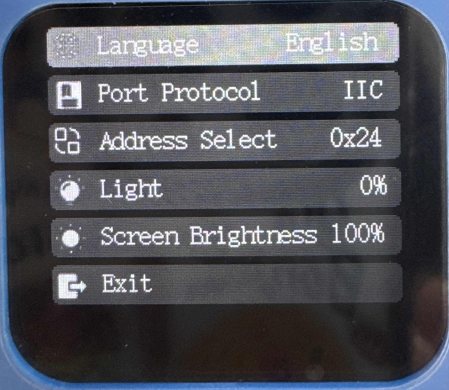
The settings interface is used to configure the module’s basic parameters, such as language, port protocols, and more.
When you first enter this interface, you need to press the button to activate the settings function.
By default, the language setting option is selected (highlighted), and you can switch to other settings (such as port protocols) by rotating the dial button left or right.
After making the desired changes, press the “Exit” button to save and exit.
Note: Some settings require a restart to take effect, and the device will automatically reboot.
Settings Options |
Description |
|---|---|
Language |
When this option is selected, press the button to switch between Chinese and English. |
Port Protocol |
The communication protocol with the K210, which is influenced by the Control Chip option. Refer to the Communication Protocol section for more details. Press the button to set the protocol. |
Address Select |
Choose the IIC address for K210. Options are 0x24, 0x25, or 0x26. Press the button to set the address. |
Light |
Used to configure the fill light at the back of the module. |
Screen Brightness |
Set the screen brightness, range from 20% to 100%, with a step of 20%. It cannot be adjusted more finely. |
Exit |
Save and exit the settings. After modifying the settings in the interface, you must click “Exit” to save the changes. The rules are as follows: |