Mode Selection Interface Overview
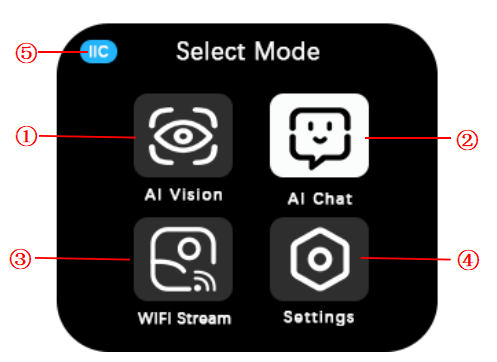
No. |
Name |
Description |
|---|---|---|
① |
AI Vision |
The AI Vision Mode includes 10 AI functions: color detection, color block tracking, AprilTag recognition, line recognition, 20-class object recognition, QR code recognition, face attributes, face ID recognition, deep learning, and road sign recognition. |
② |
AI Chat |
In AI Chat Mode, users can interact with the module through voice commands. |
③ |
WIFI Stream |
WiFi video transmission allows the module’s captured content to be displayed in real-time on a web page through network configuration. |
④ |
Settings |
Settings are used to change language, port protocols (IIC/UART/SPIKE compatibility mode), communication address, screen brightness, fill light status, and fill light brightness. |
⑤ |
Communication Protocol |
This section indicates the current communication protocol type, which can be either IIC or UART or SPIKE. |
Note: Except for the “Settings” mode, the other three modes can only be exited by performing a system reset or powering off and restarting the device.